

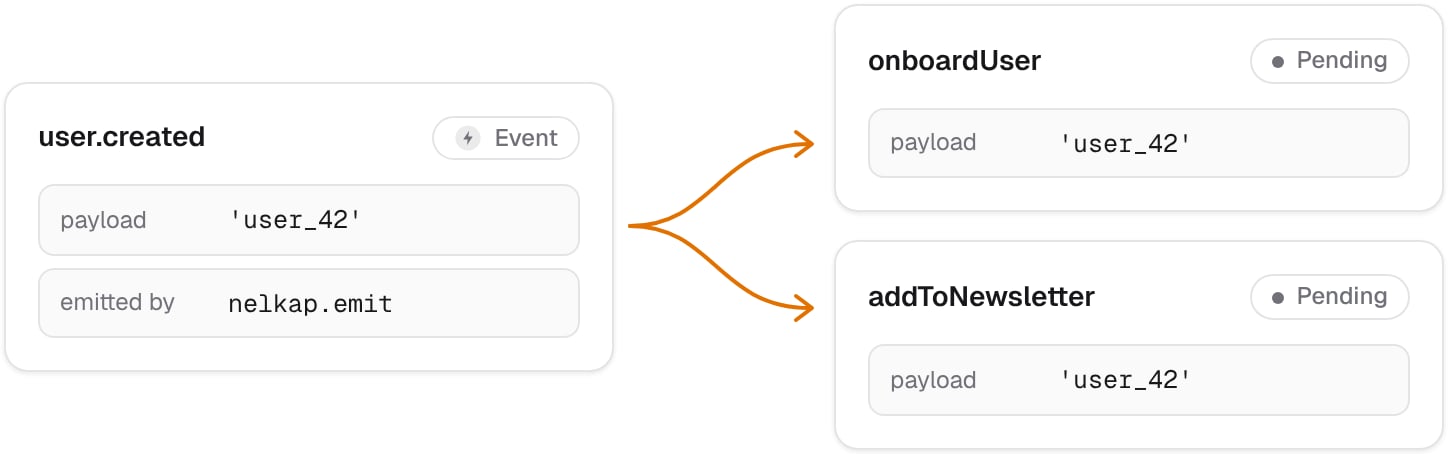
user.created or invoice.paid. You emit it once, and Nelkap does two things with it:
- It starts a run of every workflow that listens for the event.
- It wakes every run waiting on the event’s key, if the event has one.
user.created, without touching the sign-up code.
Listen for an event
List the events a workflow listens for when you register it:nelkap/index.ts
Emit an event
Callnelkap.emit from your server code:
onboardUser and one of addToNewsletter, both with the payload user_42. emit returns the IDs of the runs it started, or an empty list if no workflow listens for the event.
Wake waiting runs
A run can pause until an event arrives with a given key, withstep.wait. To wake it, emit an event with wakeOn set to that key:
refund_ord_42 resumes, and its step.wait returns the event’s payload. The same event also starts the workflows that listen for refund.reviewed, like any event. The IDs emit returns are those of the runs it started, not of the runs it woke.
Emit from a workflow
A workflow can emit events too, for example to let other workflows know that an order shipped. Emit inside a step, so the event goes out once, even when the run resumes later:Events from other services
Services like a payment provider can’t callnelkap.emit, but they can call a URL. A webhook gives you that URL, and turns each call into an event. See Webhooks.
Event history
The Events page of the console lists every event, whether your app emitted it or a webhook received it, with its project, the time it arrived, and the number of runs it started. Filter events by name, by project, by period, or by whether they started any run, for example to find events no workflow listened for. Events are kept for the history of your plan, like runs. See Retention.Errors
Every code is described in Errors.