

Set a limit
Setconcurrency when you register the workflow:
nelkap/index.ts
importContacts execute at once. The limit is a whole number from 1 to 500.
Use cases
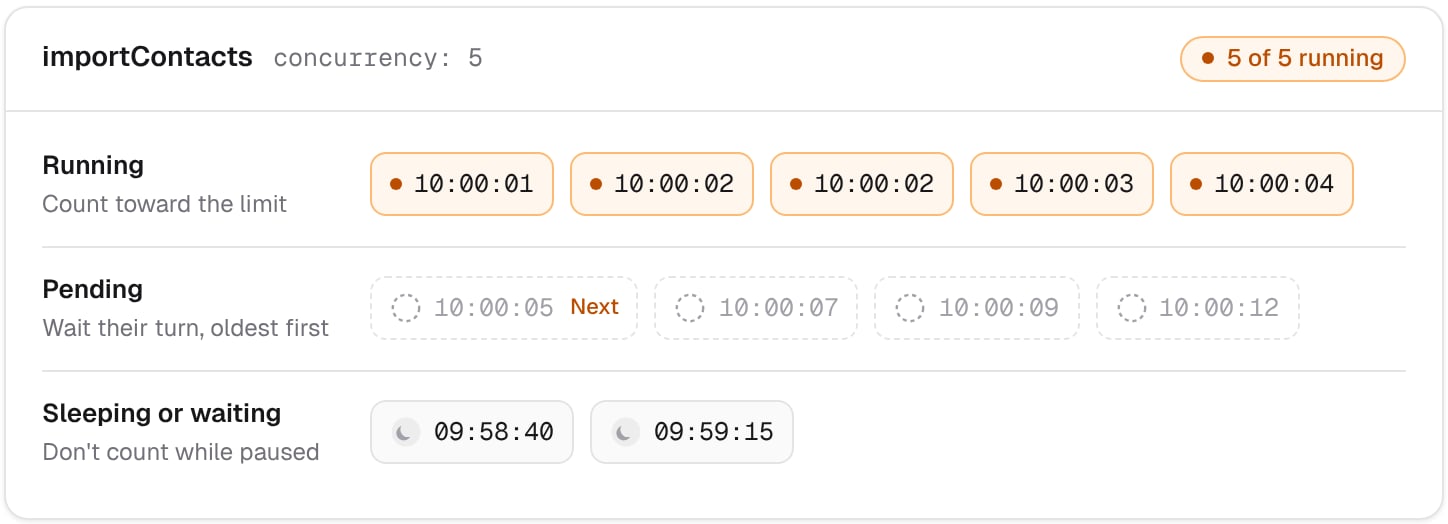
Counted runs
A run counts toward the limit from the moment it’s sent to your app until it pauses or ends:- A run on its way to your app, or running in it, counts.
- A sleeping or waiting run doesn’t, since nothing runs while it’s paused. It counts again once it wakes up and goes back to your app.
- A pending run doesn’t count yet. It’s the one waiting for its turn.
Queue order
Runs over the limit stay pending, and take their turn in the order they were created: the oldest goes first. Nelkap hands out free turns every minute, so a waiting run starts within a minute after a turn frees up. A run woken from a sleep or a wait waits for a turn too. It keeps its place by creation date, so it goes ahead of runs created after it.Workspace limit
Your workspace also has a limit on the runs executing at once across all its workflows: 50, 100, or 500, depending on your plan. A workflow withoutconcurrency only has that limit. A workflow with one gets whichever is lower. See Limits.
Change a limit
The limit you register replaces the old one at once. Raising it lets more runs start on the next minute. Lowering it never stops a run already executing: the runs over the new limit finish, and no new run starts until the count falls below it. To remove a limit, register the workflow withoutconcurrency.
Sequential runs
Withconcurrency: 1, the runs of a workflow execute one after the other, in the order they were created. That’s useful for work that must never overlap, like a nightly sync that shouldn’t start before the previous one ended:
nelkap/index.ts
The limit applies to the whole workflow, not to each customer. With
concurrency: 1, two runs for different customers also wait for each other.