

Wait on a key
A run waits on a key that you choose. Your app wakes it by emitting an event with the same key: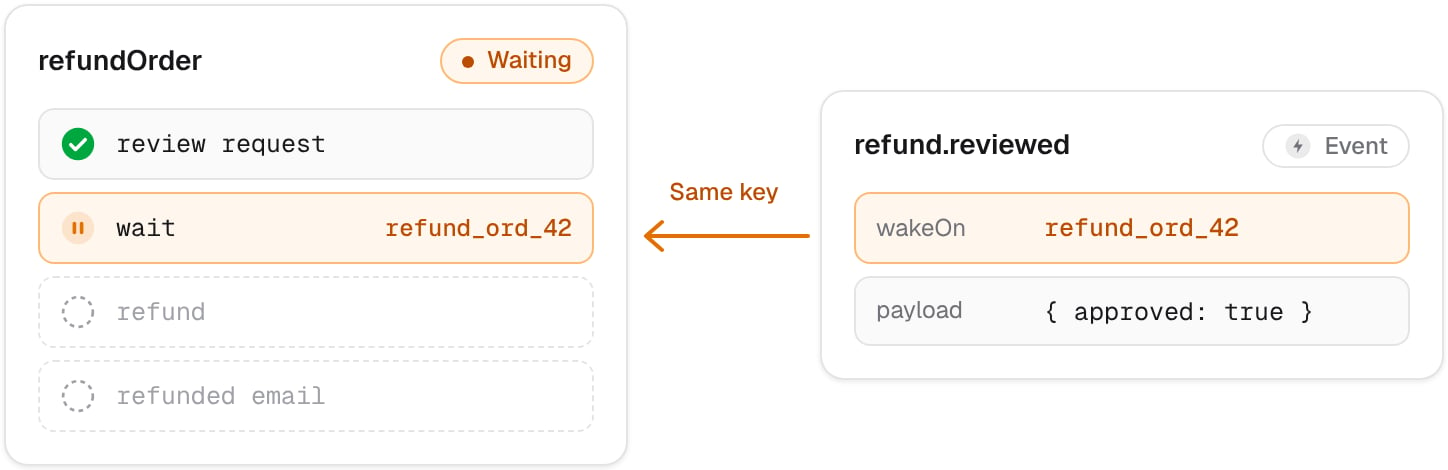
nelkap/workflows/refund-order.ts
app/refunds.ts
step.wait returns the event’s payload: here, the manager’s decision. If the event has no payload, step.wait returns null.
The type you give
step.wait, here Review, isn’t checked when the event arrives. It describes the payload your app emits, so keep the two in sync.Choosing a key
Build the key from what the run waits for, like the order it’s about. Your app can then emit the event from anywhere, without knowing the run’s ID:
A key is up to 256 characters. The run’s page shows the key it’s waiting on, next to its status.
Events sent before the wait
So ask for what you wait for in the step just before the wait, like the email that asks the manager for a review. The run reaches its wait right after that step, long before anyone can answer.Shared keys
An event wakes every run waiting on its key, not just one. That’s useful to release many runs at once, like every order waiting for a warehouse to reopen. To wake a single run, make the key unique to it, for example with the ID of what it works on.Multiple waits
A run can wait several times, on the same key or on different ones. Waits on the same key are matched in order, so a run that waits onreply_${ticketId} in a loop gets each reply in turn, as long as each one arrives while the run is waiting.
Timeouts
A run waits up to a year. After that, it fails withwaitExpired.
To give up sooner, start a second workflow that sleeps for the time you allow, then emits the event itself, with a payload that says the time ran out:
nelkap/workflows/refund-order.ts
approved: false.
Errors
Like any error your workflow doesn’t catch, it fails the run. Every code is described in Errors.